
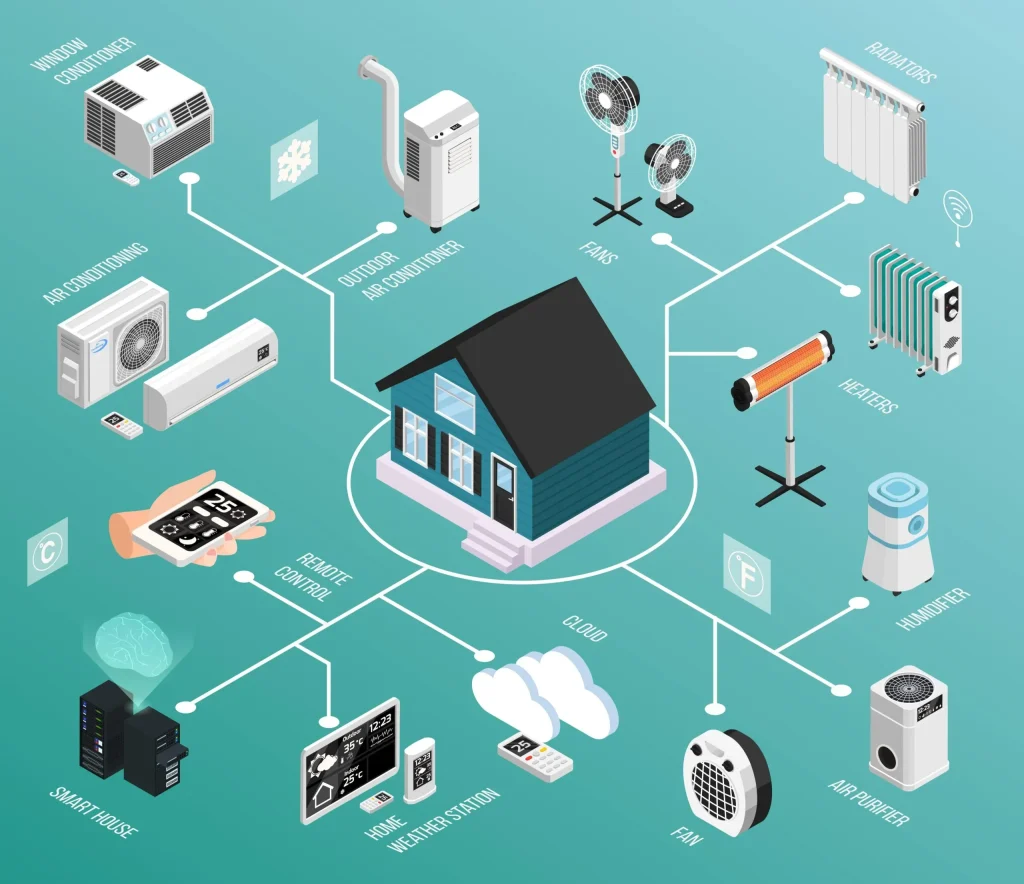
Smart Homes and IoT are transforming ordinary residences into connected ecosystems where devices communicate seamlessly to simplify daily life. From automatic thermostat adjustments to smart home devices that learn your routines, the potential for practical convenience is undeniable and growing. This beginner-friendly guide explains the core concepts, components, and practical steps to build a reliable, scalable system. By emphasizing energy efficiency and sensible security practices, you can enjoy everyday comfort while protecting your data and devices from evolving threats. With thoughtful planning, you can scale from a single device to a cohesive system that saves energy, reduces waste, and elevates daily life.
Seen through the lens of connected living, the idea is a networked ecosystem of sensors, actuators, and hubs that streamline everyday tasks. You might hear it described as connected home technology, intelligent home systems, or IoT-enabled living spaces—terms that all point to devices that talk to each other to automate lighting, climate, and security. At its core, home automation and related approaches optimize energy use, enhance comfort, and enable proactive alerts via smartphones or voice assistants. For builders and homeowners, the focus is on interoperability, privacy controls, and straightforward maintenance to keep the system reliable over time.
Smart Homes and IoT: A Practical Guide to Home Automation and IoT Security
Smart Homes and IoT turn ordinary rooms into connected ecosystems where devices share data and respond to your routines. From auto-adjusting thermostats to security cameras that alert you in real time, these technologies deliver tangible improvements in comfort and safety. A practical setup starts with core components: smart home devices, a hub or platform, and a reliable network, enabling unified control and scalable home automation across lighting, climate, security, and entertainment.
Beyond gadgets, security and privacy are central. Establish a segmented network for IoT devices, keep firmware updated, and use strong, unique credentials. Disable unnecessary cloud features, review app permissions, and enable alerts for unusual activity. These steps help reduce attack surfaces and ensure IoT security while maintaining the convenience of smart home automation.
Energy Efficiency and Voice-Driven Control with Smart Home Devices
Energy efficiency is a principal benefit of deploying smart home devices. Smart thermostats optimize heating and cooling by learning schedules; smart lighting reduces waste with dimming and occupancy sensing; energy-monitoring plugs identify energy hogs. When planned together, these devices align with off-peak usage and even solar integration, delivering measurable reductions in energy costs while keeping daily life comfortable.
Voice assistants play a central role in everyday control, enabling hands-free operation and quick orchestration of scenes. Choose a primary ecosystem or a cross-brand approach that matches your devices, ensuring compatibility and reliable routines. Build voice-driven scenes to regulate lights, climate, and media with simple phrases, while staying mindful of privacy by reviewing data handling and local-control options where available.
Frequently Asked Questions
How do I start a Smart Homes and IoT setup that improves energy efficiency while keeping IoT security strong?
Begin with a single, reliable smart device—such as a Wi‑Fi thermostat—and pair it with a compatible home automation platform. For energy efficiency, use schedules on the thermostat, smart lighting, and occupancy sensors to reduce wasted energy. As you expand, add more smart home devices and automate routines that fit your daily life. Protect your network with IoT security basics: use unique passwords, enable two‑factor authentication, keep firmware updated, and segment smart devices on a separate network.
How can voice assistants boost home automation in a Smart Homes and IoT environment, and what should I consider for privacy?
Voice assistants streamline home automation by letting you control smart home devices with simple voice commands. They enable you to trigger scenes, dim lights, adjust climate, and play media across devices with one phrase. To protect privacy, choose devices with clear data practices, enable local control when possible, limit cloud access, and prefer a single, trusted ecosystem to reduce data exposure. Verify device compatibility to ensure reliable automation across your Smart Homes and IoT setup.
| Topic | Key Points | Notes / Examples |
|---|---|---|
| Introduction |
|
Examples: automatic thermostat adjustments; security cameras with real-time alerts; beginner-friendly guidance. |
| Understanding Smart Homes and IoT |
|
Progression from a single device to coordinated multi-device scenes. |
| Core Components and Common Devices |
|
Choose reliable, compatible devices; plan hub or cloud control; ensure strong connectivity. |
| Designing a Practical Setup |
|
Example steps: set goals, implement a thermostat or lights, then add scenes and security measures. |
| Security and Privacy in Smart Homes and IoT |
|
Implement layer security measures and ongoing monitoring to reduce risk. |
| Energy Efficiency and Cost Savings |
|
Focus on devices that yield measurable energy savings over time. |
| Voice Assistants and Ecosystems |
|
Balance convenience with privacy by selecting compatible devices and reviewing data usage. |
| Practical Setup Scenarios and Tips |
|
Use staged purchases to demonstrate value and avoid overwhelm. |
| Maintenance, Troubleshooting, and Best Practices |
|
Regular checks prevent conflicts and support smoother upgrades. |
| Real-World Scenarios and Case Studies |
|
Shows how devices work together to save energy and boost safety. |
| Best Practices for Long-Term Success |
|
Focus on sustainable growth and adaptability of your Smart Homes and IoT setup. |
Summary
Conclusion: Smart Homes and IoT offer tangible advantages for daily living—from convenience and comfort to improved security and energy efficiency. By starting with clear goals, choosing reliable smart home devices, and implementing thoughtful automation, you can build a practical, scalable system that grows with your needs. The journey is not about chasing every gadget on the market but about selecting the right tools to create a more connected, efficient, and enjoyable home. With attention to security, privacy, and ongoing maintenance, your Smart Homes and IoT setup can deliver lasting benefits while remaining approachable and manageable. As you explore, remember that the best IoT-enabled homes are those that blend thoughtful design with reliable technology to make everyday life easier and more enjoyable.